


When tickets go on sale for the biggest artists and shows, our priority is making sure you—the fan—have the best chance at being there live. And that starts with helping get more tickets into the hands of fans, as opposed to bots who are trying to snatch them up and resell them.
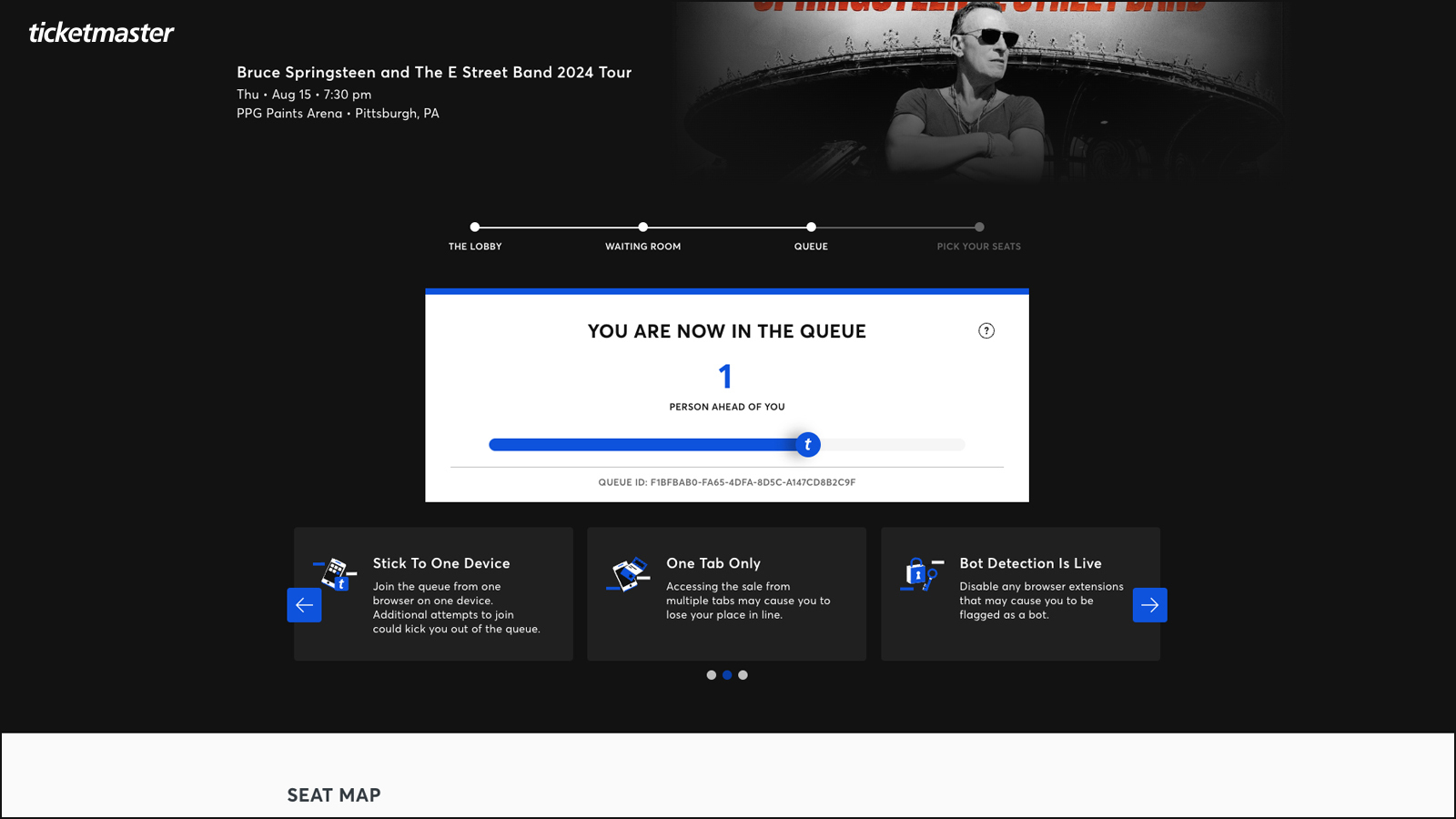
This is why you may see a Ticketmaster queue, which acts as a virtual line that uses advanced security measures to block bots and monitor traffic.
Before you purchase tickets next, here’s how it all works.
How the Ticketmaster queue works:
- Go to Ticketmaster and locate the event you want to shop for.
- Make sure to join the waiting room before the ticket sale begins. Waiting rooms typically open 15-30 minutes ahead of time.
- When the queue opens, you’ll know exactly where you are in line—and you’ll get an alert when it’s your turn to shop.
Please note: Tickets are available on a first-come, first-served basis, and are not guaranteed.
Tip: Your page will automatically refresh—this can take a moment—when you enter the queue, so there is no need to refresh the screen.
For a smoother shopping experience, we recommend doing the following:
- Sign in and make sure your payment/billing info is up to date before you enter the waiting room.
- Check that your phone number is correct (again, before the sale starts).
- Join the waiting room before the ticket sale begins — waiting rooms typically open 15-30 minutes ahead of time. If you join the queue even one minute after the sale starts, you’ll be at the back of the line.
- Use one browser or device when joining the sale. Learn more about this in the FAQ below.
And for the love of Gaga, DON’T REFRESH. Your page will automatically refresh when you enter the queue, so there’s no need to. Doing this could get you flagged as a bot and booted from the sale.
Note: You can join queues for multiple event dates, but you can only join each event’s queue once.
View this post on Instagram
Commonly Asked Questions
Why is there a Ticketmaster queue?
In addition to blocking suspicious account behavior, the queue helps to pace how many fans can shop at one time. (Only a few hundred people can shop at once—fewer for smaller venues—which is why it can seem like the queue is moving slowly.) This gives you a better chance of finding and purchasing the seats you want, since you’re only competing against real, human fans for those seats.
What’s the point of the waiting room?
The waiting room gives everyone who wants to participate in the sale an opportunity to score a good spot in the queue. Without it, the queue would order on a first-come basis, creating a race where the bots will always be faster than humans.
Is anything different when I shop for tickets where there’s a Ticketmaster queue?
The benefit of a queue is an improved shopping experience. When we use the queue, we introduce a virtual line that manages traffic flow and eliminates the crazy rush of everyone shopping at once. This gives you more time to shop and the freedom to view the entire venue and pick the exact seats you want to buy. The one thing that having a queue won’t change is that tickets are still available on a first-come, first-served basis and not guaranteed.
Do I have to stay on the page the entire time?
We recommend that you stay on the page so that you get real-time updates on your place in line, and are prepared when it’s your turn to shop.
While you’re in the queue, your spot will be automatically and frequently refreshed. If you’re shopping on desktop or a mobile browser and need to step away, we recommend turning up the volume—if your turn begins while you’re still away, you’ll hear the notification bell. When it’s your turn, your spot will be held for 10 minutes to begin shopping.
Is there a set time for when I’ll get ticket access?
No, a set time is not guaranteed. Since this process allows fans to scope out the venue and shop for the best ticket for them, there may be a longer wait than you’ve experienced before. Because we don’t want fans to feel rushed, we’ll only allow more people in when space opens up and will keep you updated on your status along the way. Remember to watch your page, as the queue can move quicker than expected and your turn can come at any moment.
Can I skip the Ticketmaster queue?
No, the queue may not be skipped. It’s set up to protect you from ticket bots, and because you can pick your exact seats from a venue map, provides a much better shopping experience for you.
Will I get tickets if I have a spot in the queue?
Just like before, tickets are always based on availability and demand, and are not guaranteed.
My activity has been paused or suspended, but I’m a real fan. What should I do?
If you encounter an error while in the queue, follow the error directions to try to resolve the issue, or try signing out and signing back in. Your place in the queue will not change. Find more troubleshooting tips here.
Can I have more than one browser open on Ticketmaster?
We recommend using only one browser on a single device. You can shop for more than one event, but each of those queues should be in a separate tab in the same browser.
Tip: Make sure to only have one tab open for each show (more than one tab per show will cause errors).
Where and when do I enter a presale code?
For some presales, if a code is required, you’ll be asked to input the code once you’re invited to shop the sale after you get to the front of the queue. Learn more about ticket presales.
For more on how Ticketmaster is combating bots and scalpers, and to learn how to avoid buying speculative tickets, check out this guide.
Tags
You Might Like
Music
What To Know About Ticketmaster’s New Mobile Ticket
When it comes to your tickets, we take safety seriously. Ticket security is essential for protecting you against fraud and ensuring you get into your event s...
Sports
Beat the Buzzer: How to Buy NBA Tickets
Scoring NBA tickets becomes an easy layup with the right game plan. From the opening tip to the game’s final seconds, Ticketmaster has basketball fans covere...
Music
How to Secure Your Account and Protect Your Tickets
Ticketmaster is committed to being the safest, most reliable ticket marketplace in the world. But when it comes to your account — where the tickets are held ...