



Ticketmaster is committed to being the safest, most reliable ticket marketplace in the world. But when it comes to your account — where the tickets are held — there are some vital steps you can take as a fan to protect against hackers looking to lay claim to your tickets.
Create a Strong Password
Make sure you’re using a strong password for your account. Your password should be unique to your Ticketmaster account, and therefore not used for any other accounts (banking, retail sites, email, etc). You can easily reset your password if you need to.
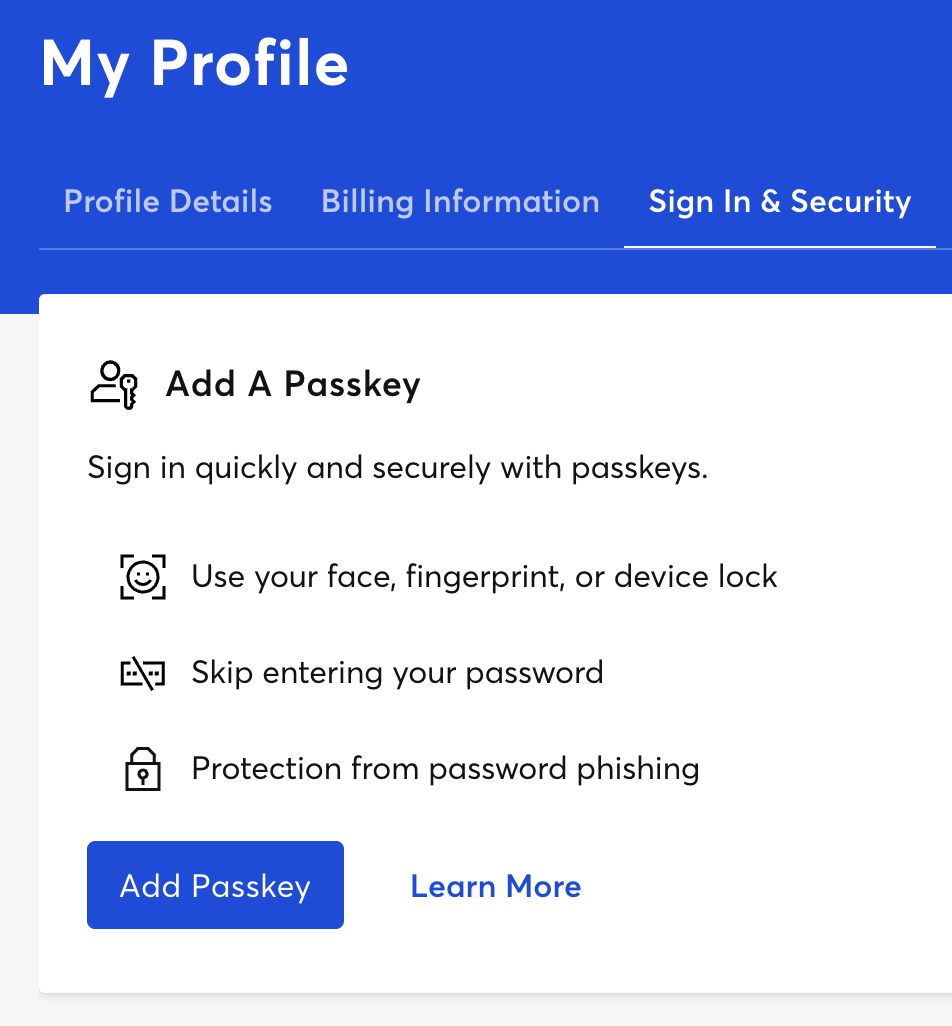
Add a Passkey
Passkeys are a secure and easy way to sign in to your account without using your password. After you add a passkey, you can quickly sign in to Ticketmaster with the same Face ID, Touch ID, screen lock or PIN setup you already use on your device. To set up a passkey, sign in to your Ticketmaster Account on desktop or a mobile browser and navigate to the Sign In and Security settings page, then follow the option to Add a Passkey.
Update Your Phone Number
Another good way to protect your tickets is to make sure the phone number associated with your Ticketmaster account is up to date. For extra security during a ticket purchase, you may also be asked to authenticate your account by inputting a code sent to your phone number.
We also recommend that the phone number you use is only associated with one account. If you have more than one Ticketmaster account in your household, it’s best to use a different phone number for each account.
In general, it’s good to double-check that all of the information in your account is correct.
There are steps you can take to secure your personal information outside of your Ticketmaster account, too. Here are some more recommendations:
Create a Secure Email Password
Just like you want to make sure your Ticketmaster password is unique, you should do the same for your personal email. Make sure you’re using a strong, unique password there, too. If your email gets hacked, which unfortunately does happen, it could allow bad actors to use it to try to gain access to your Ticketmaster account.
Complete a Security Check
Most fans will never receive this message, but if we see suspicious activity, we may ask you to confirm your identity to secure your account. You can complete this by uploading a photo and an official government ID through a trusted third-party identity verification service like Persona.
The email will come from Ticketmaster Fan Support using a Ticketmaster.com domain (ex: notification@email.ticketmaster.com or notification@ticketmaster.ca), and contains a secure link to begin the process. If you’ve received an email and are unsure it’s legit, you can contact Fan Support.
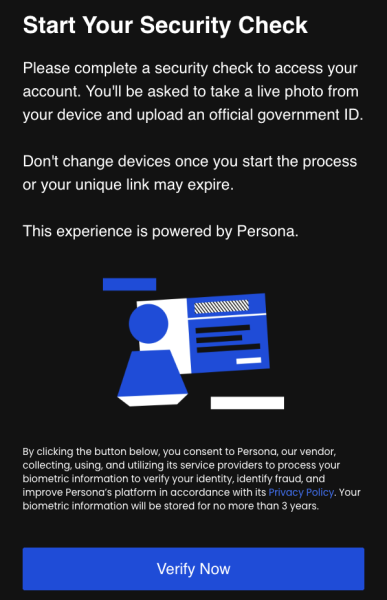
These checks are to help us authenticate accounts for added security. The process only takes 1-2 minutes and can be completed easily on a mobile device. Results of the check will be returned within 3-5 days. Learn more about the security check process.
Be Cautious of Fakers Posing as Ticketmaster Employees
If you ever run into issues with your account and need help, you can contact our Fan Support team — they’re here to assist. But be aware of scammers sharing fake information about Ticketmaster, including fake customer service phone numbers that appear in search engines.
Always make sure you’re getting contact information from our official website. There are several ways to get in contact with us, and our dedicated online Fan Support page offers extensive information on frequently asked questions.
Finally, Ticketmaster will never ask you to buy a gift card in order to refund you. If we do issue a refund, we’ll process it to the original method of payment you used at time of purchase.
Don’t Post Screenshots of Your Tickets or Order Number
If you post a screenshot of your ticket on social media for all to see, you could potentially risk losing it. Your mobile ticket has a one-of-a-kind barcode, and if a scammer or bad actor acquires it, they can make duplicate tickets to use or sell, which can potentially cause issues when trying to scan your tickets at the venue.
Furthermore, avoid posting screenshots that expose personal information like your first and last name, order number, address, or credit card. Instead, use Ticketmaster’s built-in social media share feature to spread the news about your tickets with your friends and family.
Tags
You Might Like
Music
You Got the Tickets! How To Safely Share Your Ticket Pics
You marked your calendar. You joined the queue. And now the day has come — you got tickets to the event you just can’t miss. What do you want to do next? Tel...
Sports
Your Ultimate Game Plan: How to Buy NFL Tickets
It’s good! Celebrate an easy win by securing your NFL tickets with Ticketmaster, the Official Ticket Marketplace of the NFL. Whether you’re scoring seats for...
Music
Find the Seats You Want With Ticketmaster’s Interactive Seat Map
Ticketmaster’s interactive seat maps make it easy to find the seats you want for your next concert, game or show. When you’re buying tickets, there’s a lot t...